A recognized leader in event technology
Award-winning event software.
RSVPify is honored to be recognized for its innovation, intuitive event software functionality, and exceptional customer support.




RSVPify is honored to be recognized for its innovation, ease of use, and exceptional customer support — see what our customers have to say:

Diana B
Communications Strategist
"RSVPify has been instrumental in helping us communicate with our employees and community partners. It’s a dynamic and useful tool for promoting events effectively, and the staff helped answer questions we had at a moment's notice! Couldn’t be happier with the how RSVPify has helped up engage our community."

Purina Nestle

Tiffany K
Associate Director of Alumni Relations
“As an event leader or manager, you have to communicate everything that is happening. RSVPify made it easy for me to do my job - i.e., to see numbers of who responded, who has not yet responded, communicating all in one spot, updating event details in a quick way. I feel like it saved me hours.”

The Bush School

Darius T
Commercial Director
"RSVPify has been a game-changer for managing our awards event invitations. It’s sleek, intuitive, and helps us deliver a seamless experience to our high-profile guests.”

WhatsOnStage

Sophie C
Wildlife Conservation Network
“RSVPify’s system allows us to manage RSVPs on an individual level within groups or families, which is a game-changer for us. It enables us to have more personalized communication with our donors, like sending specific messages about who we look forward to seeing at an event and who we’ll miss. This level of detail and personalization was something we couldn’t find with other platforms.”

Wildlife Conservation Network

Taryn W
Creative Director
“Hands down, [RSVPify] has streamlined event registration. It’s easier for attendees to register, it’s saved us admin time, and it’s made communicating with event attendees so much easier.”

Blockchain Association

Bill R
Director of the Amici Fund & Alumni Relations
“RSVPify has been my favorite of all of the event management platforms that I've used. People need to gather for community - for their health, for their mental health. So what a great tool that you're building for people to create events.”

Woodberry Forest School
RSVPify is honored to be recognized for its innovation, intuitive event software functionality, and exceptional customer support.









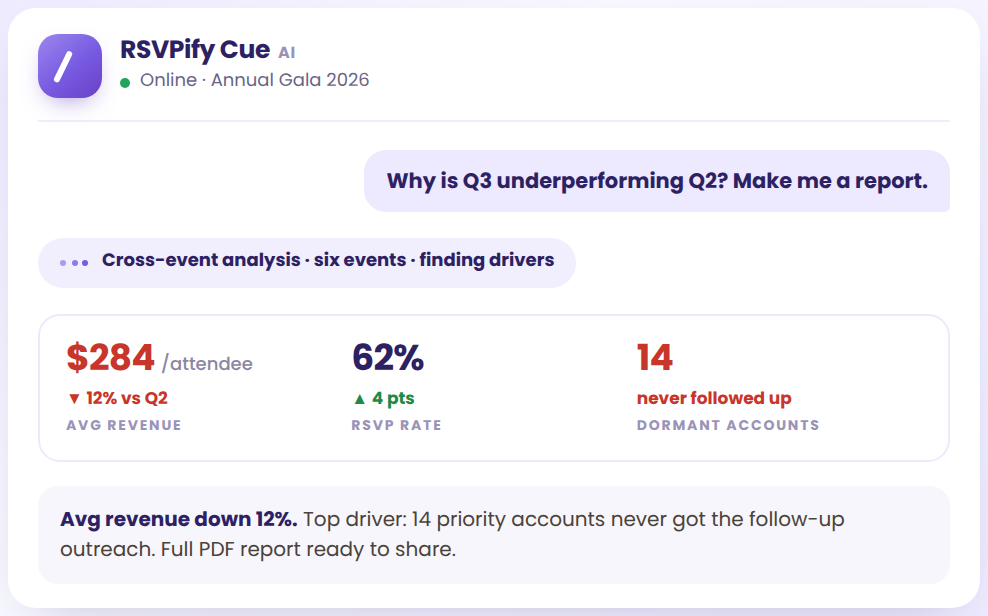

The RSVPify MCP is a Model Context Protocol server that connects your live RSVPify workspace to an AI assistant. MCP is an open standard that lets assistants like Claude and ChatGPT read data and take actions in outside tools. With RSVPify's, you can build events, manage guests, send campaigns and pull reports by describing what you want in plain language.
Any MCP-ready assistant, including Claude, ChatGPT, Cursor and tools your team builds in-house. You connect RSVPify once as a connector in the assistant you already use, then work with your event data in that conversation. There is no separate RSVPify chat window to learn and no switching between tabs.
Add RSVPify as a connector in your AI assistant and sign in with your RSVPify workspace credentials. Setup takes a few minutes and requires no code, no developer and no separate API key work. Your session inherits the role and permissions your RSVPify account already has, so you see exactly what you would see in the app.
It builds both. Describe the event and RSVPify creates a working registration form and a branded event website, not a copy suggestion. You can point it at a URL and have it pull your brand styling, specify the questions the form should ask, and set the registration flow. Everything arrives as a draft for you to review before it goes live.
Yes. You can import a guest list, tag segments such as VIPs or sponsors, assign seating, update RSVPs and pull check-in status, then send campaigns and reminders to any segment you describe. Importing a 240-person CSV, tagging one company's executives as VIP and seating them at the head table is a single request.
You can analyze anything collected at registration, including ticket sales, attendance, check-in data, guest responses, donations and meal preferences, across one event or your whole workspace. Ask for a post-event wrap-up covering attendance, revenue and dietary requirements and you get a finished report exported to PDF, XLSX or CSV, with the revenue and attendance figures event ROI calculations need.
No RSVPify data is used to train foundation models, for any provider, and nothing publishes, sends or goes live until a person approves it. RSVPify is SOC 2 Type II certified and aligned with GDPR and CCPA. MCP sessions inherit the permissions of the RSVPify account behind them, every action is audit-logged, and admins can revoke access at any time.
Yes. RSVPify Cue is an AI assistant built directly into your RSVPify workspace, with nothing to install or connect. Create events from a plain instruction, ask questions of your event data in everyday language, draft guest emails and reminders, and automate reporting on attendance, revenue and engagement. Cue is available on RSVPify for Enterprise. See rsvpify.com/rsvpify-cue/ to learn more.