Trusted by 150,000+ event teams G2 4.8 ★★★★★ Capterra 4.8 ★★★★★ SOC 2 Type II View all features → Book a demo

Pricing
Available in RSVPify for Enterprise

Hand off the guest list. Keep full control.

Table Captains takes the work out of managing group registrations. Every sponsor, board member or host gets a simple portal to invite their own guests, so you get real names, not 'Sponsor Guest 1."

Guests laughing around a round banquet table at a fundraising gala
150,000+
event teams trust RSVPify
4.8 out of 5
rating on G2
4.8 out of 5
rating on Capterra
SOC 2 Type II
certified
Watch the overview

See Table Captains in Action

Selling the table is the easy part. Filling it is where planning stalls.

Without Table Captains

Guest names trickle in through messy email threads and spreadsheets. Dietary needs go missing, and "Sponsor Guest 1" remains on your list the week of the event. Leaving you with day-of check-in chaos and missing crucial donor and attendee insights for post-event stewardship.

With Table Captains

One captain invites their own guests through a self-service portal. Each attendee registers directly with their own name, dietary needs, and preferences—giving you control over managing group registrations, a clear line-of-sight, and rich profile data to know exactly who is in the room.

From a reserved table to a full guest list in three steps

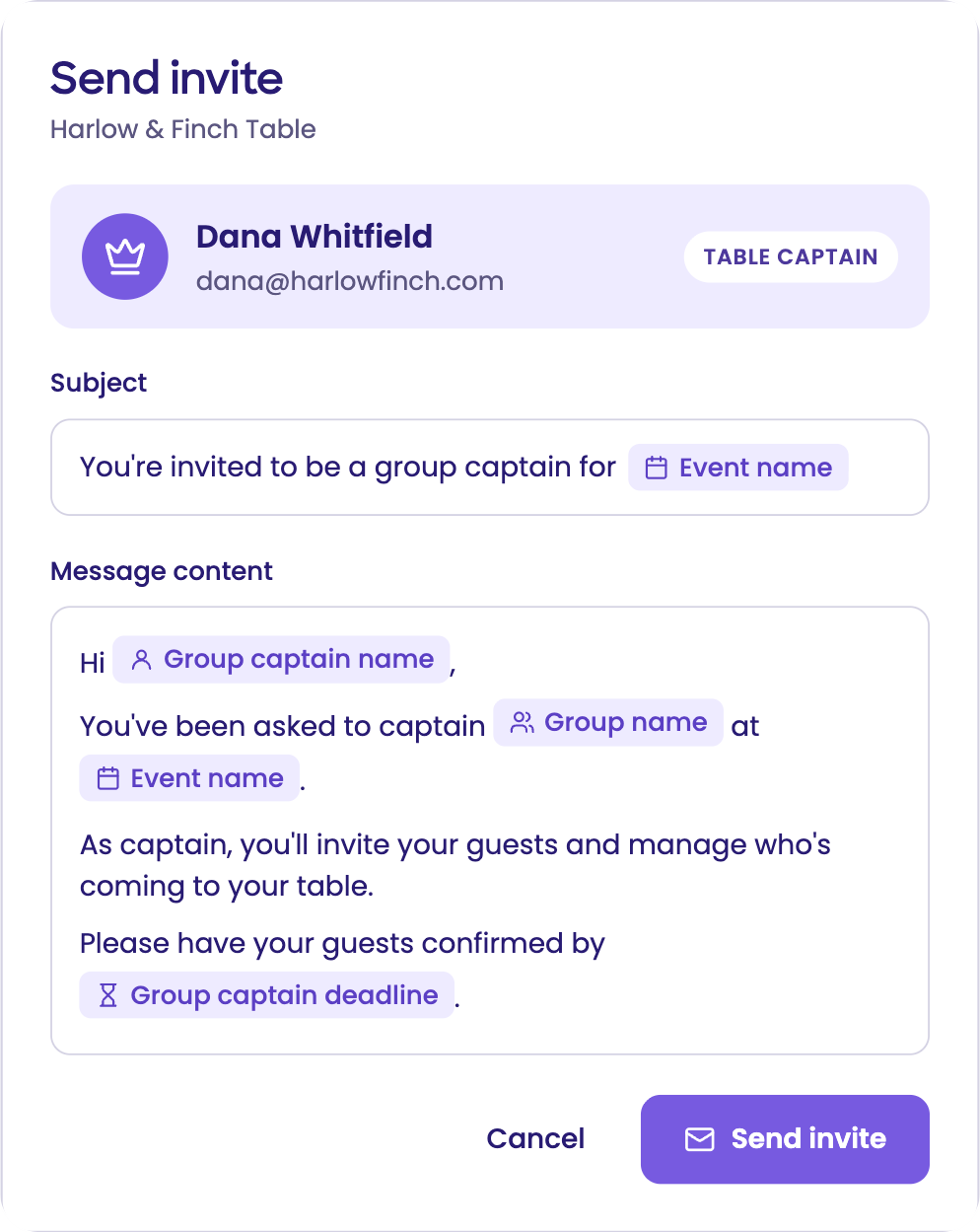
  1. Send invite screen inviting Dana Whitfield to captain the Harlow & Finch Table
    1

    Invite the table captain

    Sponsors reserve a table on your event site. Create the group, then send its captain one email invite. No password needed.

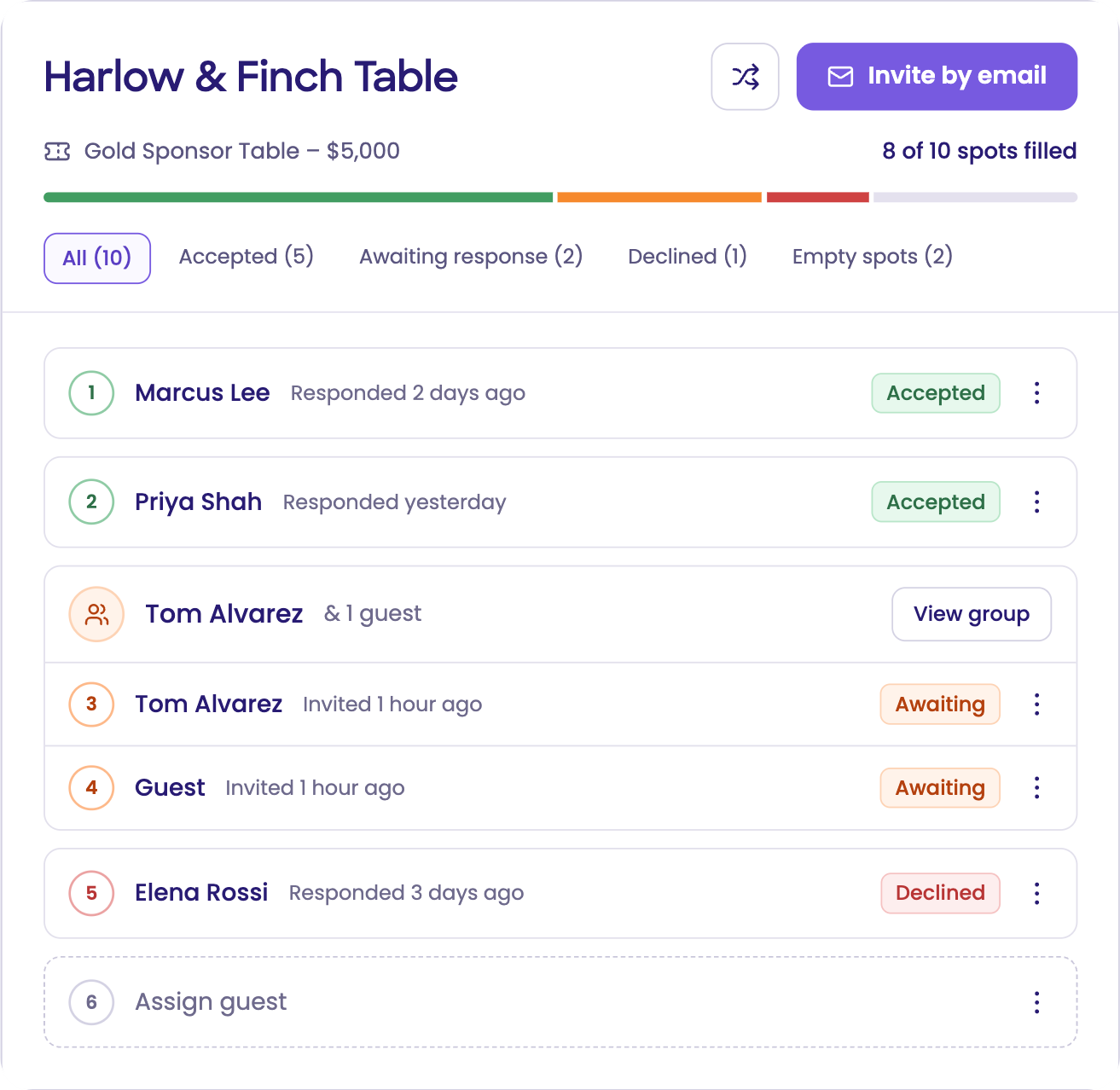
  2. Captain portal showing accepted, awaiting, and declined guests and an open seat at the Harlow & Finch Table
    2

    Captains invite guests and track every seat

    Each guest gets a personal invite. Captains see who's accepted, nudge anyone pending, or release a seat back to the organizers.

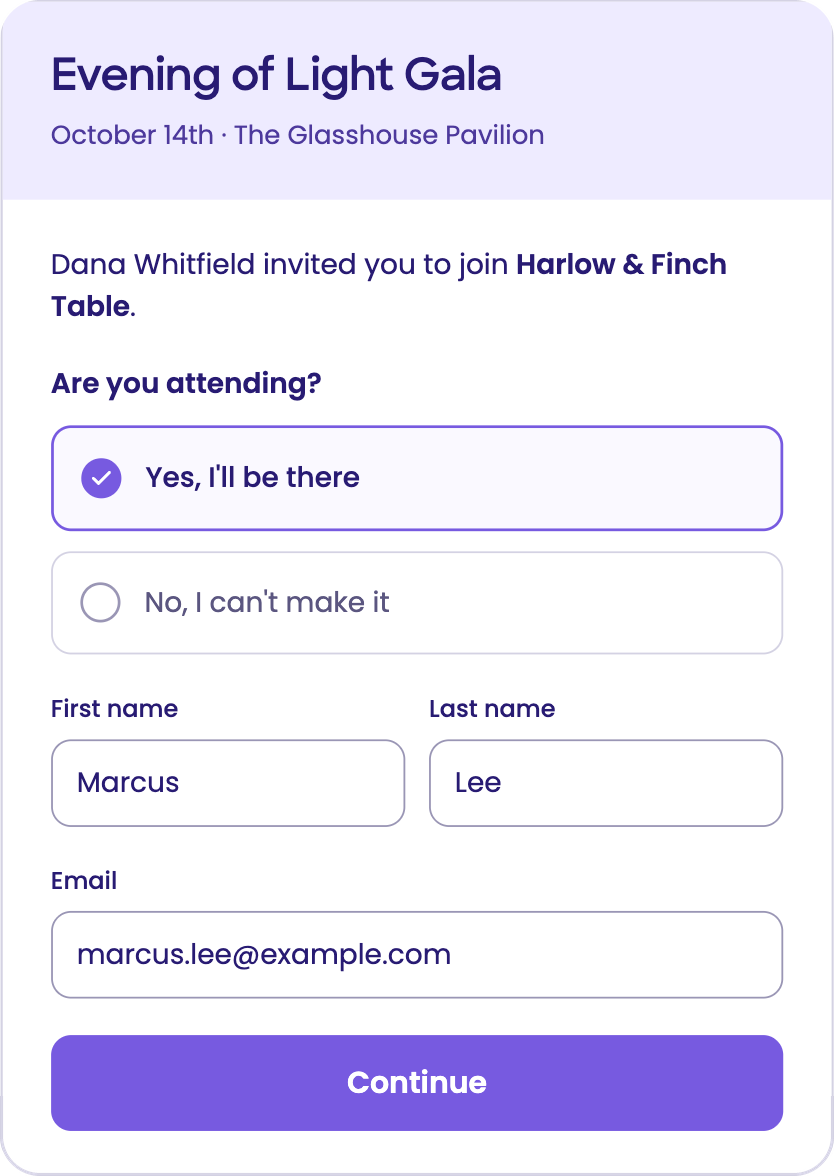
  3. Guest RSVP form for the Evening of Light Gala with attendance, name, and email fields
    3

    Guests register themselves

    Every guest RSVPs with their own details, like dietary needs, so real names replace placeholders on your list.

Swipe to see all three steps →

From a reserved table to a full guest list in three steps

Step 1

Invite the table captain

Sponsors and board members reserve a table package right from your event site and pay by card, ACH, or an offline method you accept. Create the group in seconds, then send one email invite to its captain, usually the person who reserved the table. No password to set up.

Step 2

Captains invite guests and track every seat

Each guest gets a personal invitation from someone they know, with their own link. Captains see every seat as accepted, awaiting, declined, or empty, send a friendly reminder, or release a seat back to the organizers.

Step 3

Guests register themselves

Every guest RSVPs and shares their own details, like dietary needs and accessibility requests. Real names replace placeholders on your guest list automatically.

Your team sees every table, live

Every table rolls up to one Group Management view, so you know which tables are full, which captains haven't started, and where to step in.

Live progress for every table

See confirmed, pending, and open seats for each group as replies come in.

No logins for captains

Captains accept from an emailed link and manage their table from there. No account or password to create.

Better guest data

Dietary and accessibility details come straight from each guest, not secondhand through the captain.

Offline payments, covered

Record checks and other offline payments in a few clicks, alongside card and ACH.

Open seats come back to you

When a captain releases a seat, it returns to your team to fill.

You keep the final say

Edit anything a captain does until your cutoff date. After that, only your team can make changes.

Built for galas. Ready for any group.

Table Captains works for any event where one person brings a group: galas, sponsor tables, corporate outings, and more.

Gala and donor tables

Table hosts invite their guests, and every guest shares their own dietary and accessibility details.

Sponsor and exhibitor packages

Sponsor contacts fill their allotted seats or passes without emailing your team a spreadsheet.

Corporate outings and golf foursomes

Group leads invite each colleague or player, who registers with the details you ask for.

Team and volunteer groups

Team leads invite members, who add their own details before your deadline.

Season ticket and suite groups

Group leads manage their roster and release seats they won't use.

Questions planners ask

Which plan includes Table Captains?

Table Captains (group registration) is part of RSVPify for Enterprise. Request a demo and we'll walk through how it fits your events.

Do table captains need an RSVPify account?

No. Captains accept an emailed invitation and manage their table from there, with no password to set up.

Can I add a captain myself?

Yes. Invite the person who reserved the table, or assign any captain yourself.

How do sponsors reserve and pay for a table?

They choose a table package on your event site and pay by card, ACH, or an offline method you allow. Your team can record checks and other offline payments in a few clicks.

Does every guest need their own email address?

Yes. Each guest gets a personal link, so each one needs a unique email address.

Can guests join a table from a public link?

No. Captains invite each guest personally, so only invited guests can claim a seat.

What can I change after captains start inviting?

Anything a captain does, up to your cutoff date. After the cutoff date, only your team can make changes.

What happens to seats a captain can't fill?

The captain releases them, and they return to your team to fill.

What's the easiest way to manage group registration for a gala or event?

Managing group registration is easiest when each group handles its own guests. With RSVPify Table Captains, every sponsor, host or team lead gets a simple portal to invite their guests, and each guest registers with their own details. Your team tracks every table in real time and keeps final control.

Give every seat a personal invitation.

See how Table Captains fills your tables with real names. Request a demo and we'll walk through it with your next event in mind.

A captain's table showing accepted, awaiting and declined guests, with an empty seat to assign