

A recognized leader in event technology
Award-winning event software.
RSVPify is honored to be recognized for its innovation, intuitive event software functionality, and exceptional customer support.

Top Rated on G2

4.7/5
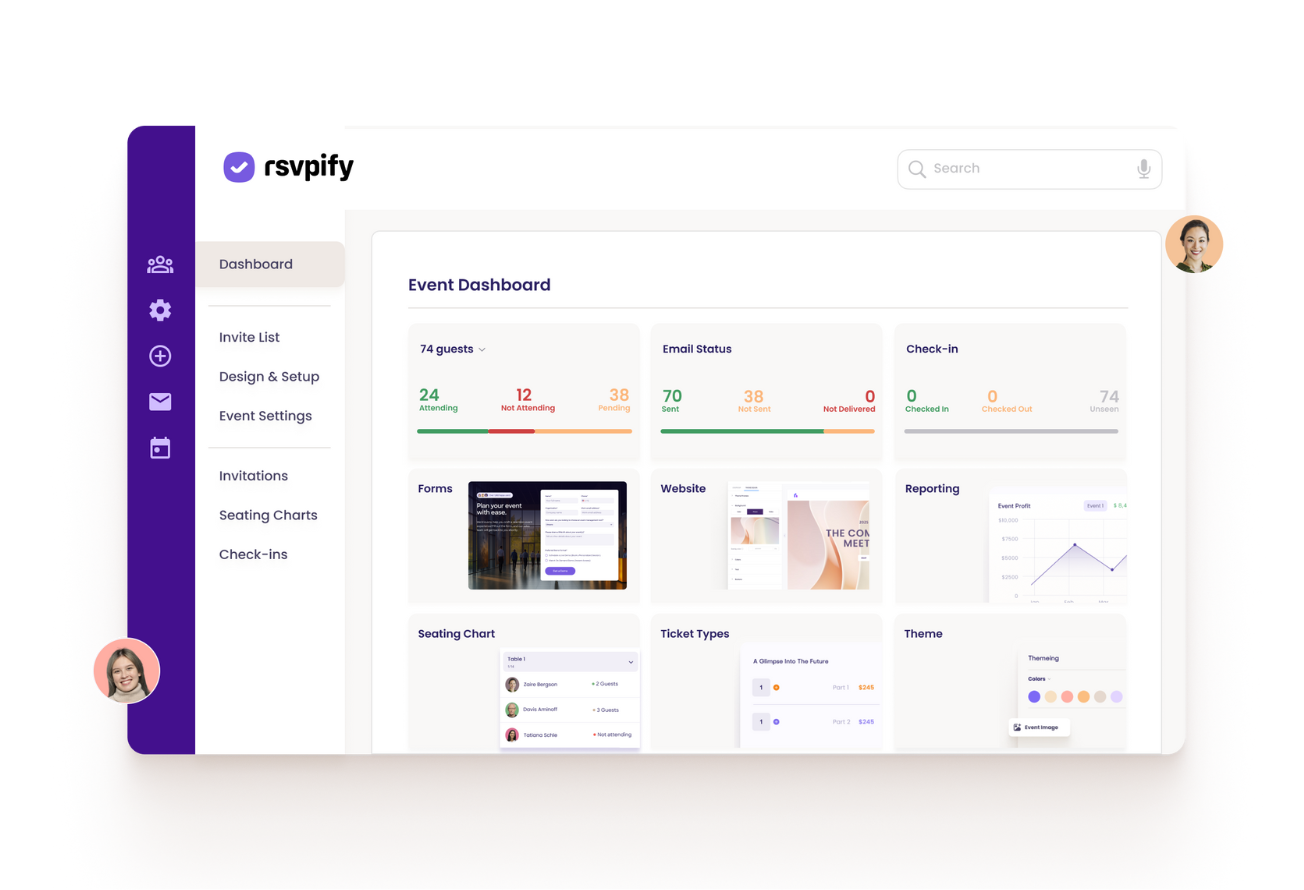













Manage all aspects of a single event or many events in one event management dashboard. Track attendance, ticket sales, attendee info, and more in one place.

Add event collaborators with appropriate permission levels to share the event planning load, communicate with stakeholders, and centralize your event calendar.

From small VIP events to conferences, RSVPify scales up and down as needed. Manage your entire event calendar and duplicate recurring events to save hours on event setup.

Export attendee responses, event ticket sales, seating charts, or any info you need to measure event ROI. Integrate with Salesforce, Hubspot, or other leading CRM and marketing tools.
RSVPify is honored to be recognized for its innovation, ease of use, and exceptional customer support — see what our customers have to say:

Diana B
Communications Strategist
"RSVPify has been instrumental in helping us communicate with our employees and community partners. It’s a dynamic and useful tool for promoting events effectively, and the staff helped answer questions we had at a moment's notice! Couldn’t be happier with the how RSVPify has helped up engage our community."

Purina Nestle

Tiffany K
Associate Director of Alumni Relations
“As an event leader or manager, you have to communicate everything that is happening. RSVPify made it easy for me to do my job - i.e., to see numbers of who responded, who has not yet responded, communicating all in one spot, updating event details in a quick way. I feel like it saved me hours.”

The Bush School

Darius T
Commercial Director
"RSVPify has been a game-changer for managing our awards event invitations. It’s sleek, intuitive, and helps us deliver a seamless experience to our high-profile guests.”

WhatsOnStage

Sophie C
Wildlife Conservation Network
“RSVPify’s system allows us to manage RSVPs on an individual level within groups or families, which is a game-changer for us. It enables us to have more personalized communication with our donors, like sending specific messages about who we look forward to seeing at an event and who we’ll miss. This level of detail and personalization was something we couldn’t find with other platforms.”

Wildlife Conservation Network

Taryn W
Creative Director
“Hands down, [RSVPify] has streamlined event registration. It’s easier for attendees to register, it’s saved us admin time, and it’s made communicating with event attendees so much easier.”

Blockchain Association

Bill R
Director of the Amici Fund & Alumni Relations
“RSVPify has been my favorite of all of the event management platforms that I've used. People need to gather for community - for their health, for their mental health. So what a great tool that you're building for people to create events.”

Woodberry Forest School

Track RSVPs send targeted event comms.

Create online invitations or upload your own design.

Create smart pricing tiers and exclusive VIP offerings.

Use custom questions and form logic for curated registration experiences.

Let guests select multi-course meals and share dietary needs.

Manage invite-only sub-events with ease.

Hosting a private event? Keep it exclusive with advanced security.

Easily manage check-in from any device with RSVPify’s check-in system.
RSVPify is honored to be recognized for its innovation, intuitive event software functionality, and exceptional customer support.







The RSVPify event dashboard is your central hub for creating events, managing guest lists, tracking RSVPs and ticket sales, sending communications, and monitoring check-in and attendance. It gives you a real-time view of everything happening across your event or events.
Yes. You can manage unlimited events from a single account, making it easy to oversee recurring meetings, annual programs, or multiple concurrent events without switching tools.
Absolutely. Even for a single event, the dashboard provides a clean, centralized place to manage guests, track responses, monitor payments or donations, and send updates—replacing spreadsheets, inbox searches, and manual lists.
Yes. You can duplicate past events, including their forms, questions, tickets, and settings. This is ideal for teams running recurring events, trainings, or similar programs throughout the year.
Yes. You can add multiple users with different permission levels so team members only access what they need. This supports collaboration across marketing, operations, finance, and on-site staff.
Yes. All RSVPs, ticket purchases, donations, and check-ins update in real time. You always know how many people are attending, who has arrived, and how your event is performing.
Yes. You can filter guests by RSVP status, ticket type, session, donor level, meal choice, or custom fields. This makes it easy to manage communications and logistics for specific groups.
Yes. You can export guest lists, financial reports, attendance data, and custom responses to CSV or Excel at any time for reporting, accounting, or sharing with partners.
RSVPify integrates with leading tools like Salesforce, HubSpot, Mailchimp, and Google Sheets. You can sync attendee data, automate follow-ups, and connect registration insights directly to your existing CRM or marketing systems.